Your crew doesthe work.ReeveCrew doesthe paperwork.
Construction software for trade subcontractors. Your foreman clocks in the crew and gets T&M tags signed on site. Progress claims go out with holdback worked out, and notice deadlines count down in working days. The AI drafts the rest. You check it and send it.
Free while in beta
Set up with you
Works on any phone, nothing to install
6:00
Brief written at 6:00 AMBefore the first crew clocks in
Change notice CE-N-0142 working days left to send it
T&M tag 122 ready to signThe GC's super signs it on site
Built for trade subcontractors
Electrical
Mechanical
Plumbing
Glazing
Drywall
Concrete
Holdback in Canada, retainage in the US
BC's overtime, stat holiday, WorkSafeBC and lien rules built in
Inbox
Every message lands on the right job.
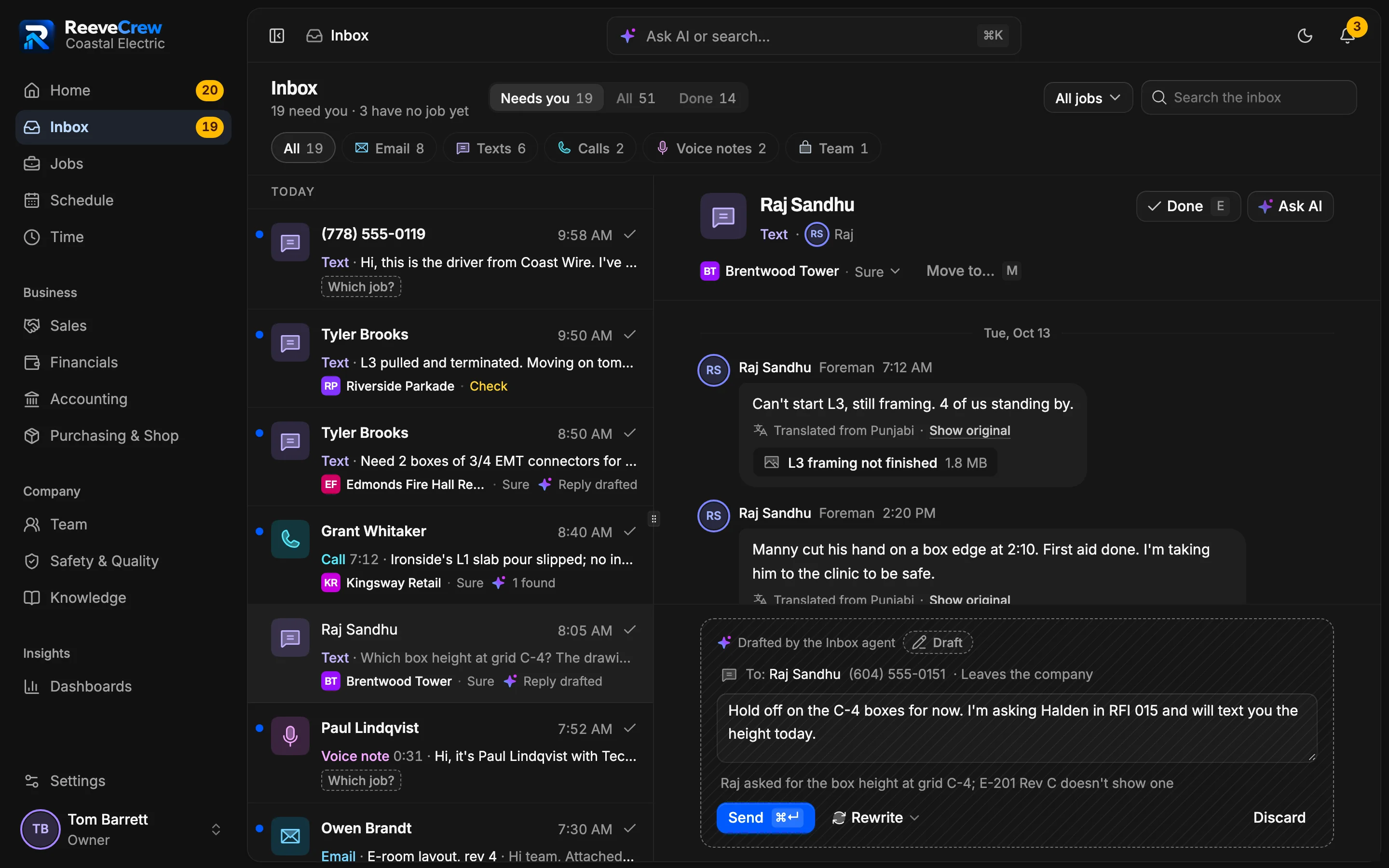
Email and text the GC, suppliers and your foremen from the job, and keep a team thread for the office and the crew. The AI files what comes in to the right job and drafts the next step. You check it and send it.
See that it got there
Email or text from the job's conversation, with attachments. Each message shows whether it was delivered, and a failed send can be tried again.
It asks when it isn't sure
A voice note about “the Burnaby job” could mean Brentwood Tower or Burnaby Depot, so it asks you instead of guessing.
You press send
The AI's drafts wait beside the message they answer, from a reply to a delay notice. Nothing goes out until a person sends it.
Inbox/4 filed to 3 jobs · 1 asks which jobAI
BTBrentwood Tower2
Raj Sandhu·TextTranslated from Punjabifrom PunjabiCan't start L3, still framing. 4 of us standing by.Reading…Delay notice to Halden drafted · $736 standby
Raj Sandhu·Voice note 0:40Done for today. Amrit, Jose, Lee and me, 8 hours each. Manny is off.Reading…Daily report drafted · 4 timesheets, 32 h
KRKingsway Retail1
Grant Whitaker·Call 7:12Ironside's L1 slab pour slipped; no install date until it's poured.Reading…Schedule change drafted · L1 install waits for the pour
RPRiverside Parkade1
Lisa Wu, Halden·EmailRiverside Parkade kickoff: Sun, Oct 25 at 8 AM. Mobilization dates to follow.Reading…Reply drafted · kickoff Sun, Oct 25, 8 AM
Which job?1
Paul Lindqvist·Voice note 0:31About your rough-in inspection for the Burnaby job. I need the permit number.Reading…Brentwood Tower or Burnaby Depot?
Five messages from a morning at Coastal Electric, the demo company in the app.
The inbox in the app, with the demo company. Raj's text came in Punjabi and reads in English, with the original one tap away. It's filed to Brentwood Tower, and the reply the AI drafted waits for you to send.
Money and deadlines
Get paid for the work you already did.
Subs lose money in the gaps between the site and the office: tags nobody signs, notices that miss their window, holdback nobody chases. ReeveCrew closes each gap the day it opens.
Examples from Coastal Electric, the demo company in the app
Where the money leaks
What ReeveCrew does
In Coastal Electric, the demo company
Where the money leaks: On siteExtra work gets done on a handshake, and the tag never gets signed.
What ReeveCrew does:
T&M tags signed on site
The GC's super signs on your phone, and signed tags go on a change order for your next claim.
In Coastal Electric, the demo company:
T&M tags, Brentwood Tower
$3.9K
Sign on phone
in 6 tags waiting for a signature
Where the money leaks: When a delay hitsThe delay was real. The notice went out a day after the window closed.
What ReeveCrew does:
Notice clocks in working days
Weekends and BC stat holidays don't count, and you're warned a working day before a notice lapses.
In Coastal Electric, the demo company:
Notice CE-N-014
2 working days left
FriToday
Satnot counted
Sunnot counted
Mon1
TueDue
Where the money leaks: End of the dayThe daily report gets written from memory days later, if at all.
What ReeveCrew does:
Daily reports signed the same day
The foreman signs it on the phone, and the GC gets a PDF on your letterhead that day.
In Coastal Electric, the demo company:
Daily report, Raj Sandhu
Signed
46 devices installed on L4 east
PDF emailed to Halden
Where the money leaks: Friday nightSomeone retypes the paper timesheets and guesses the cost codes.
What ReeveCrew does:
Crew hours checked before approval
Missed clock-outs and clocks that don't match the daily report are flagged, and clean weeks go through in one tap.
In Coastal Electric, the demo company:
Kulwinder, Wednesday
1.5 h apart
Clock
9.5 h
Daily report
8 h
Where the money leaks: Month endThe claim gets rebuilt in a spreadsheet, and a short payment slips by.
What ReeveCrew does:
Claims from your schedule of values
Holdback comes off at the job's rate. Match each pay certificate to see what's paid, held and owed.
In Coastal Electric, the demo company:
Billed to Halden
$737.2K
Paid
$632.9K
Held
$73.7K
Owed
$30.6K
Where the money leaks: After the jobHoldback sits with the GC for months, and nobody chases it.
What ReeveCrew does:
Holdback tracked to the day it's due
See what's held on every job and the day BC's lien rules say it's due back, then bill the release in one step.
In Coastal Electric, the demo company:
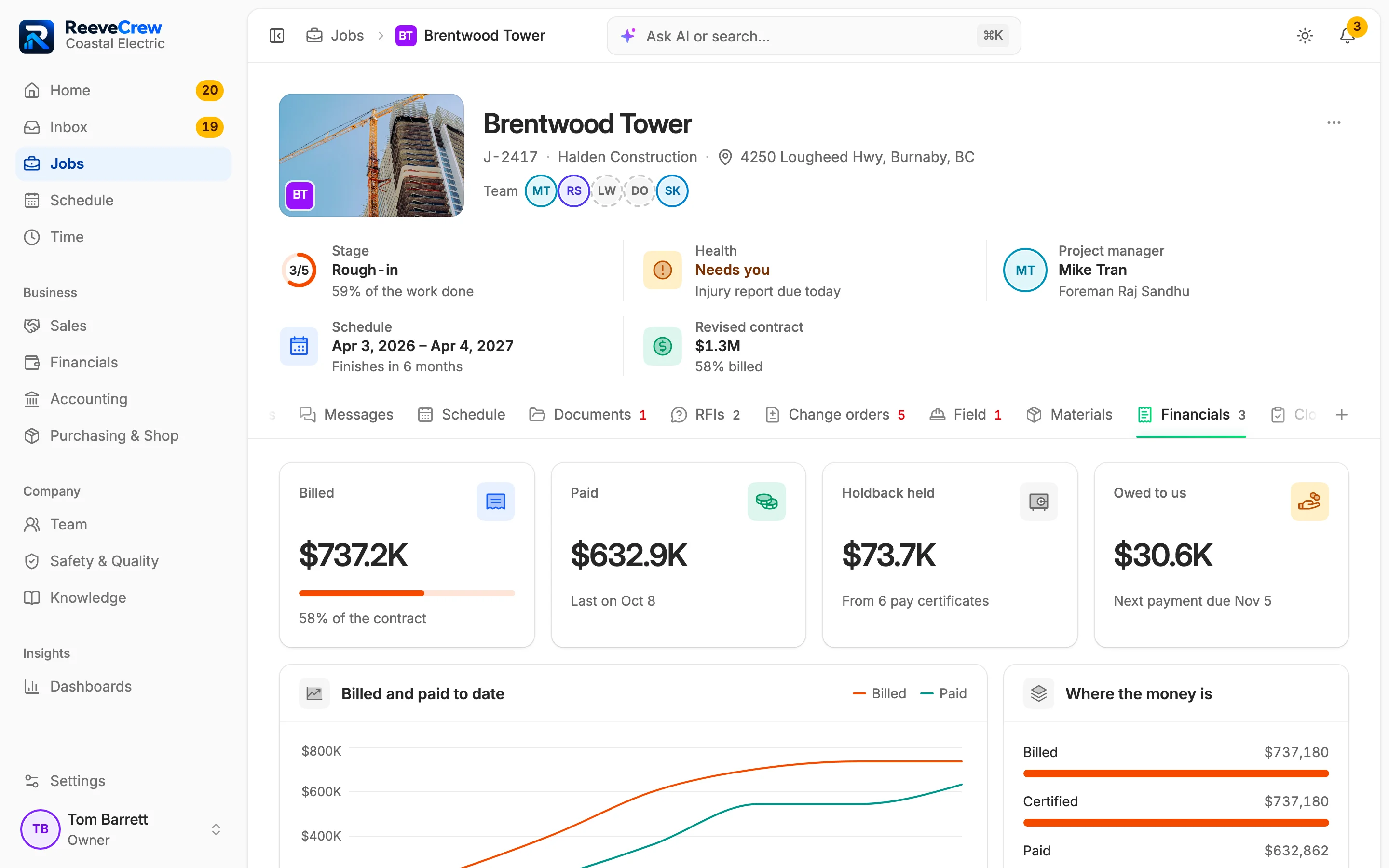
Holdback, Brentwood Tower
$73.7K
Bill the release
held on 6 pay certificates
Figures from Coastal Electric, the demo company in the app. Holdback is called retainage in the US. BC's notice, overtime, stat holiday and lien rules are built in today.
Follow Brentwood Tower, a job in the demo company, through a day in the app: from the 6:00 AM list to the month-end claim, with each step on record as it happens.
Works in the app today
The AI's draft in the demo company, for you to check.
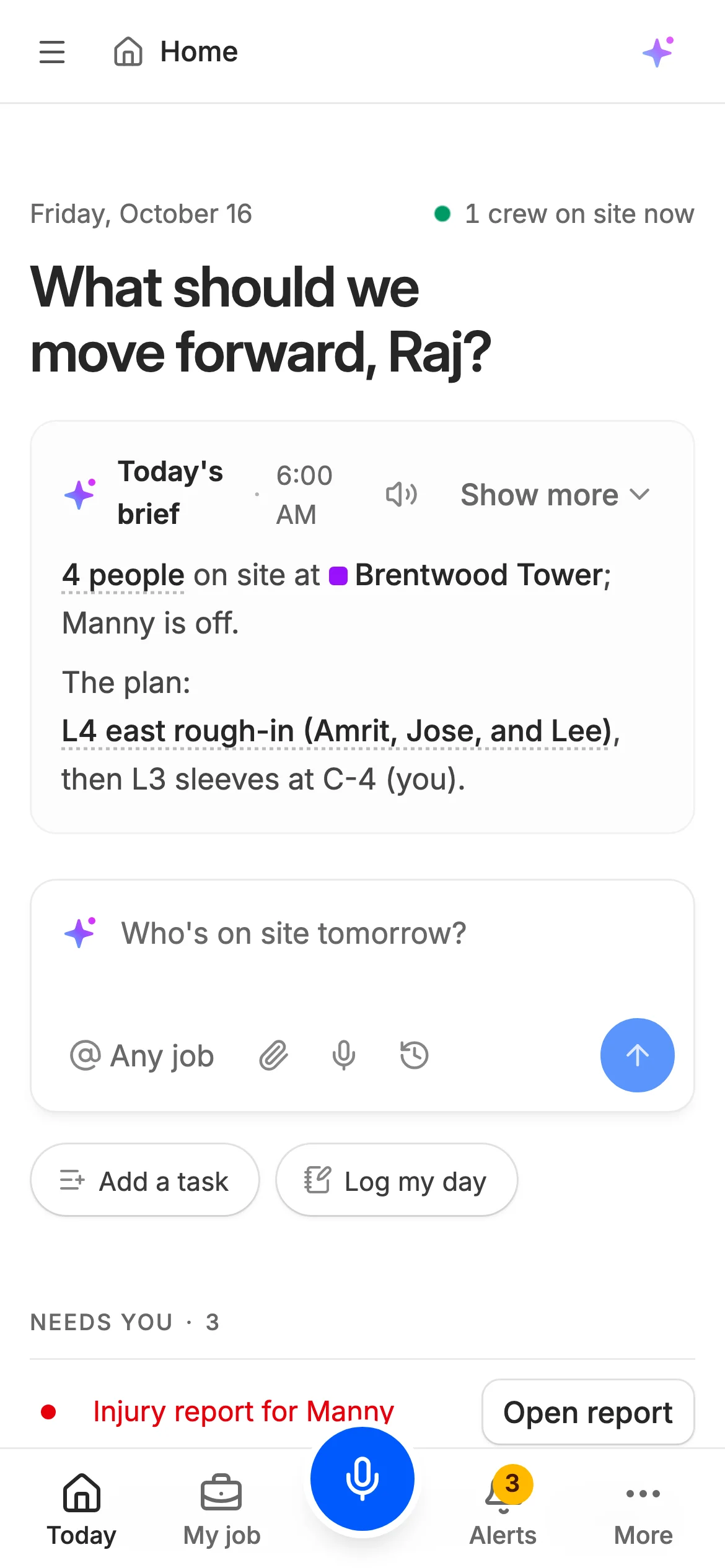
6:00 AM
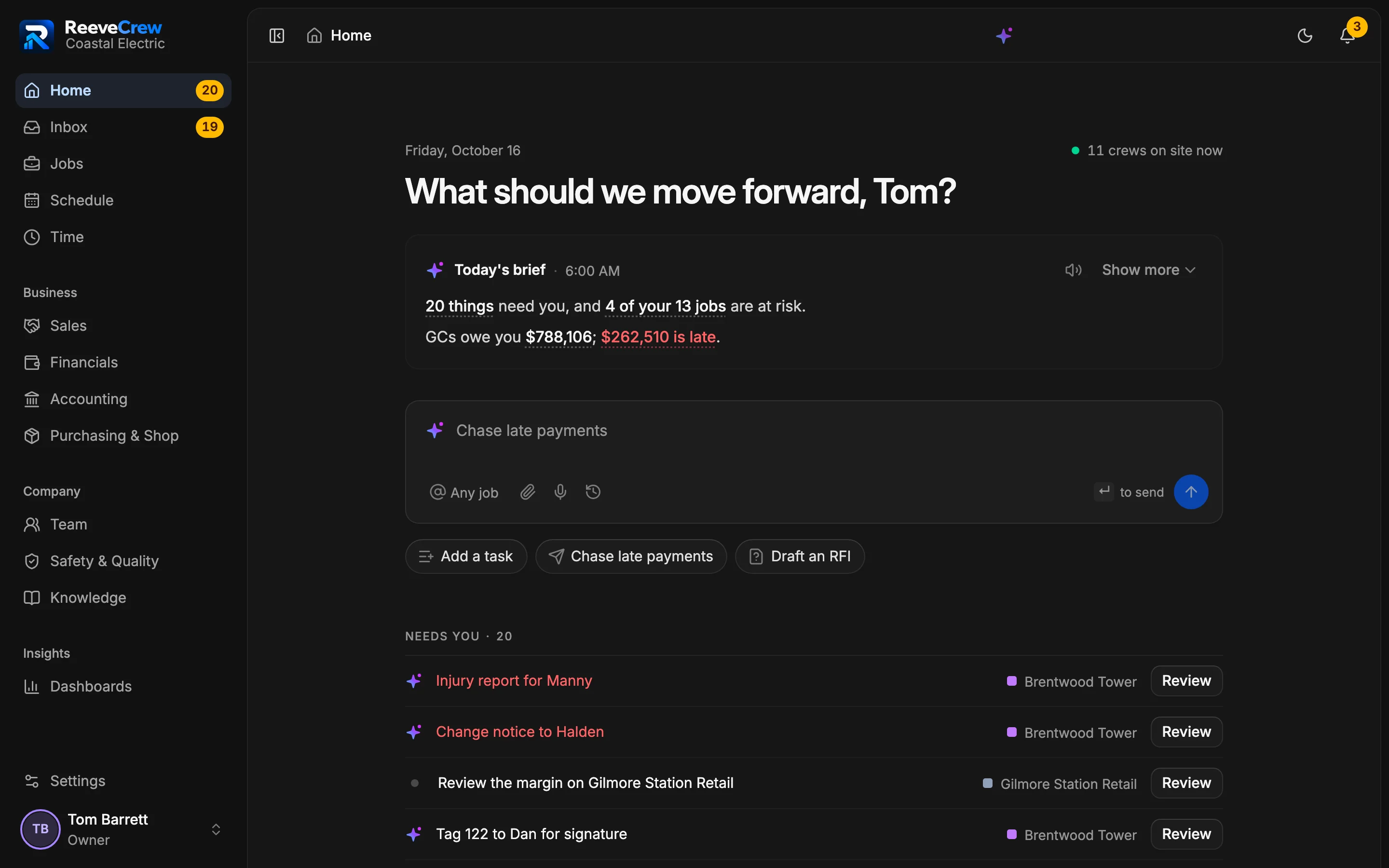
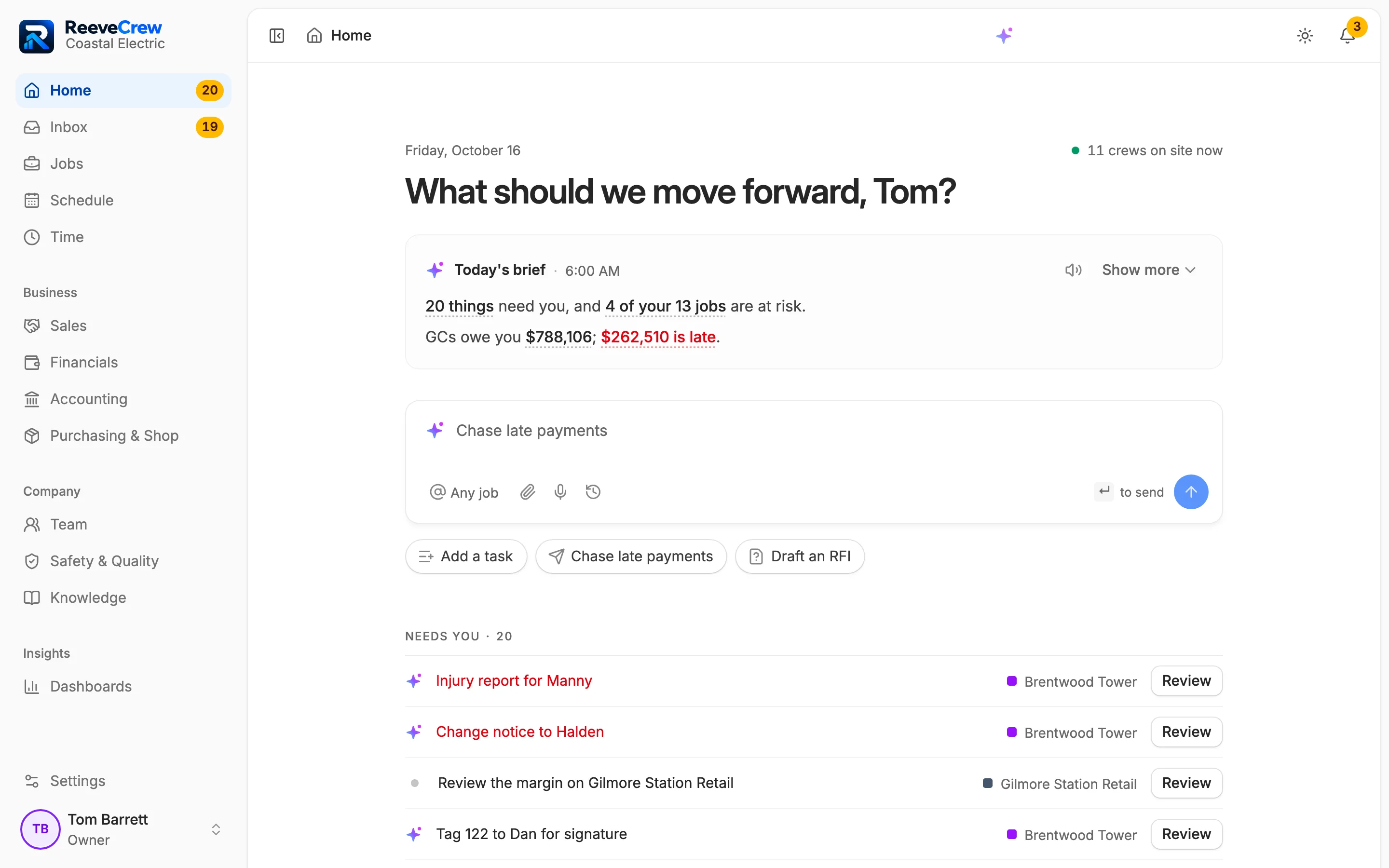
Start with what needs you
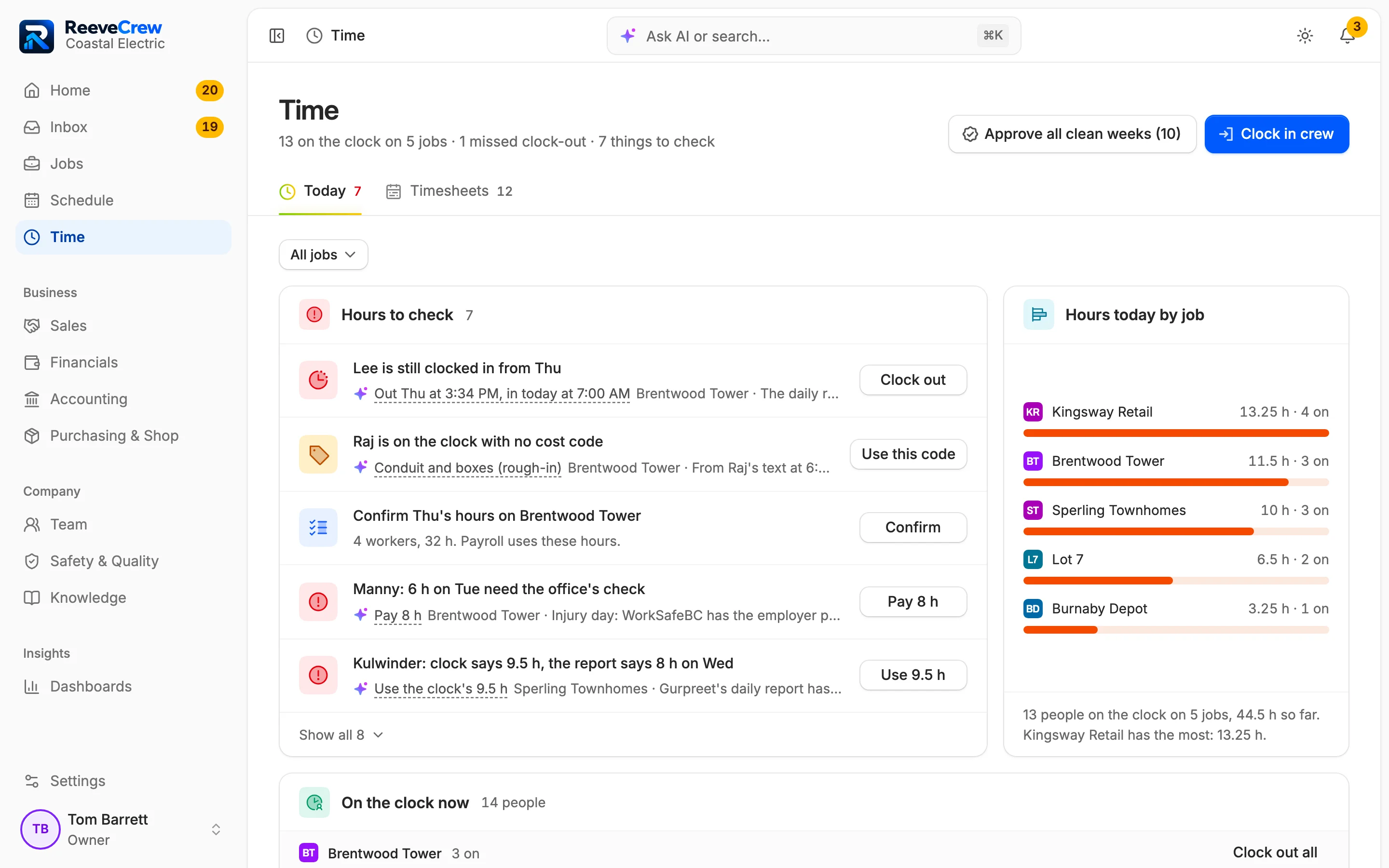
Home lists what's waiting on you, each with the button that clears it. Snooze one to Monday or hand it to your PM.
Needs you list
Snooze or hand off
The AI's draft: Morning brief
Home
7:00 AM
The crew clocks in with one tap
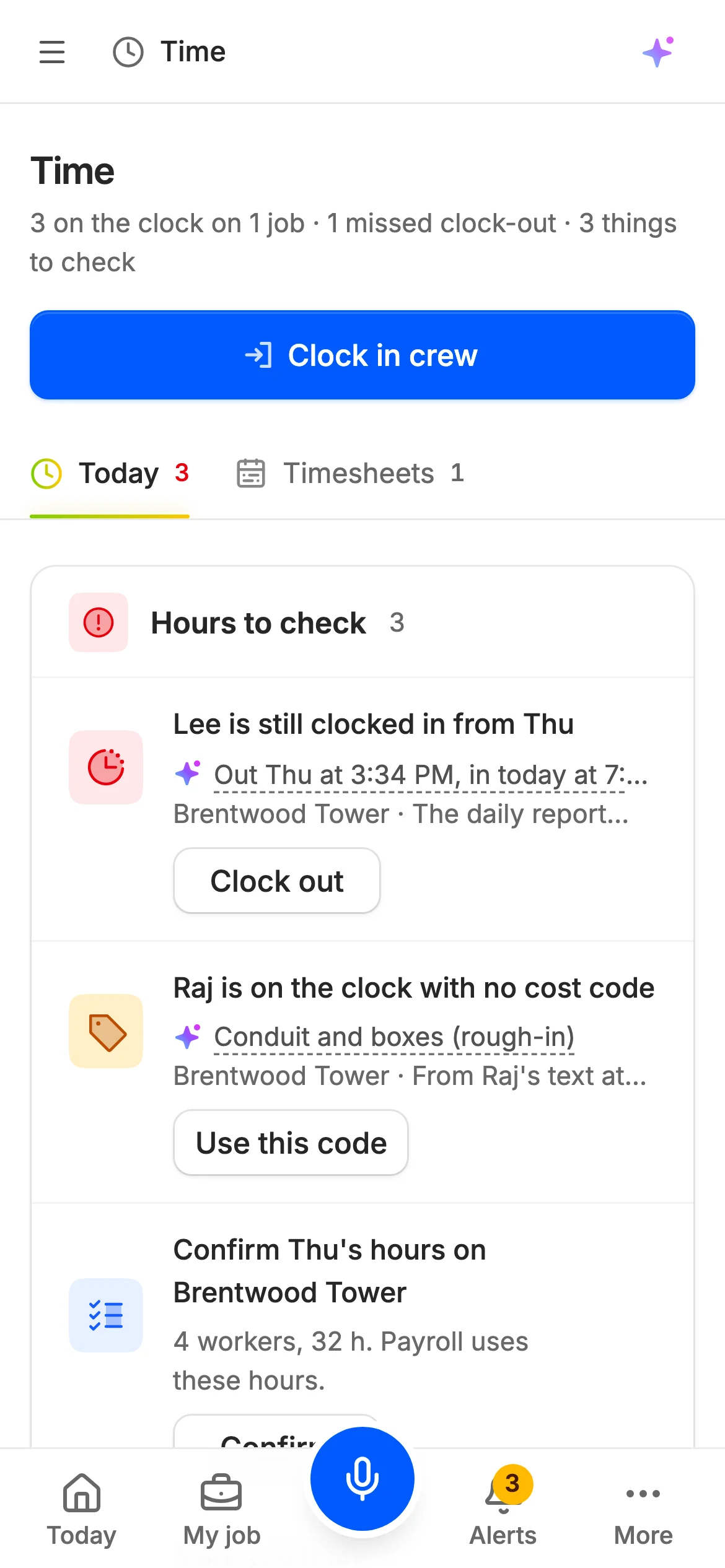
Raj clocks in his whole crew from his phone. Time shows who's on the clock on each job, and Lee's missed clock-out is already flagged.
One-tap crew clock-in
Missed clock-out flags
The AI's draft: Suggested cost code
Time · Today
9:30 AM
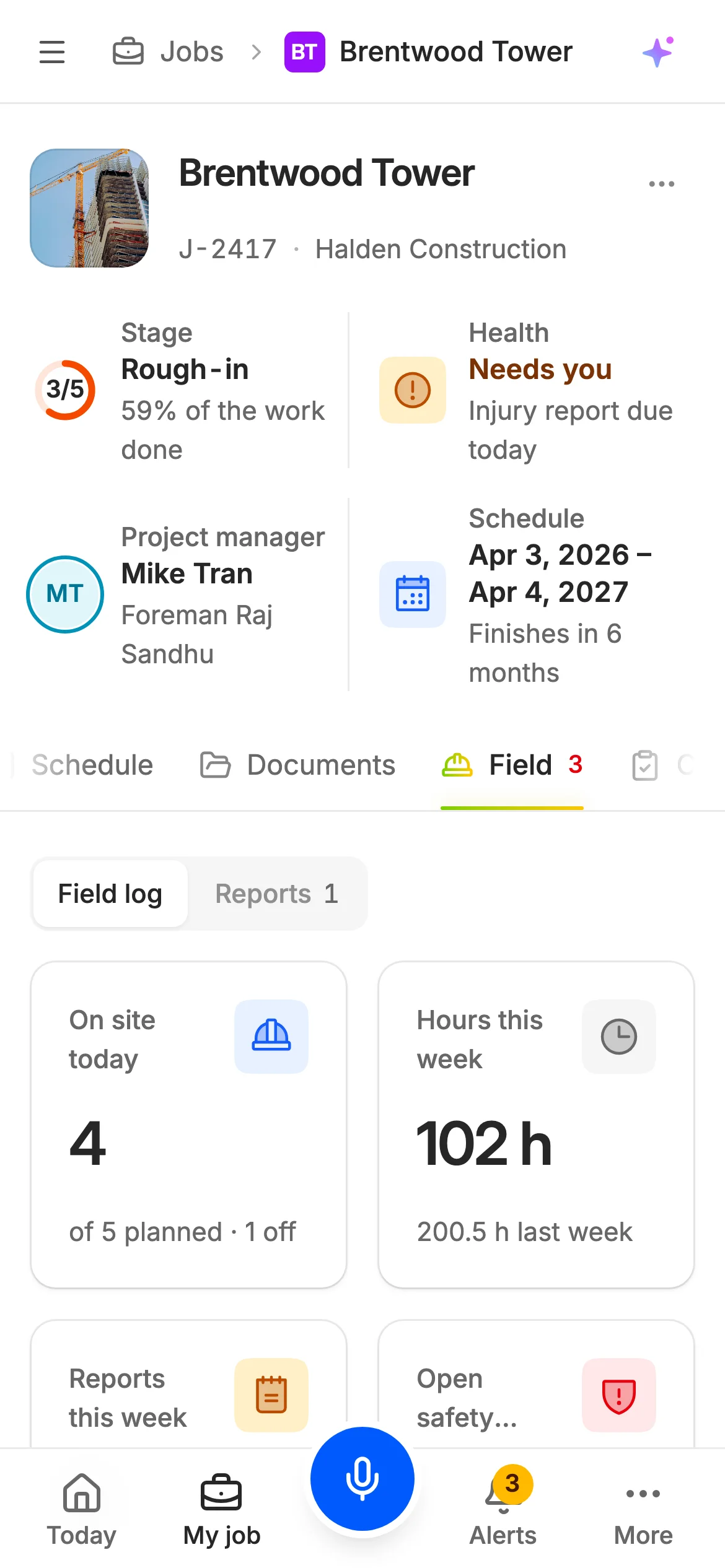
Where the job stands, on one page
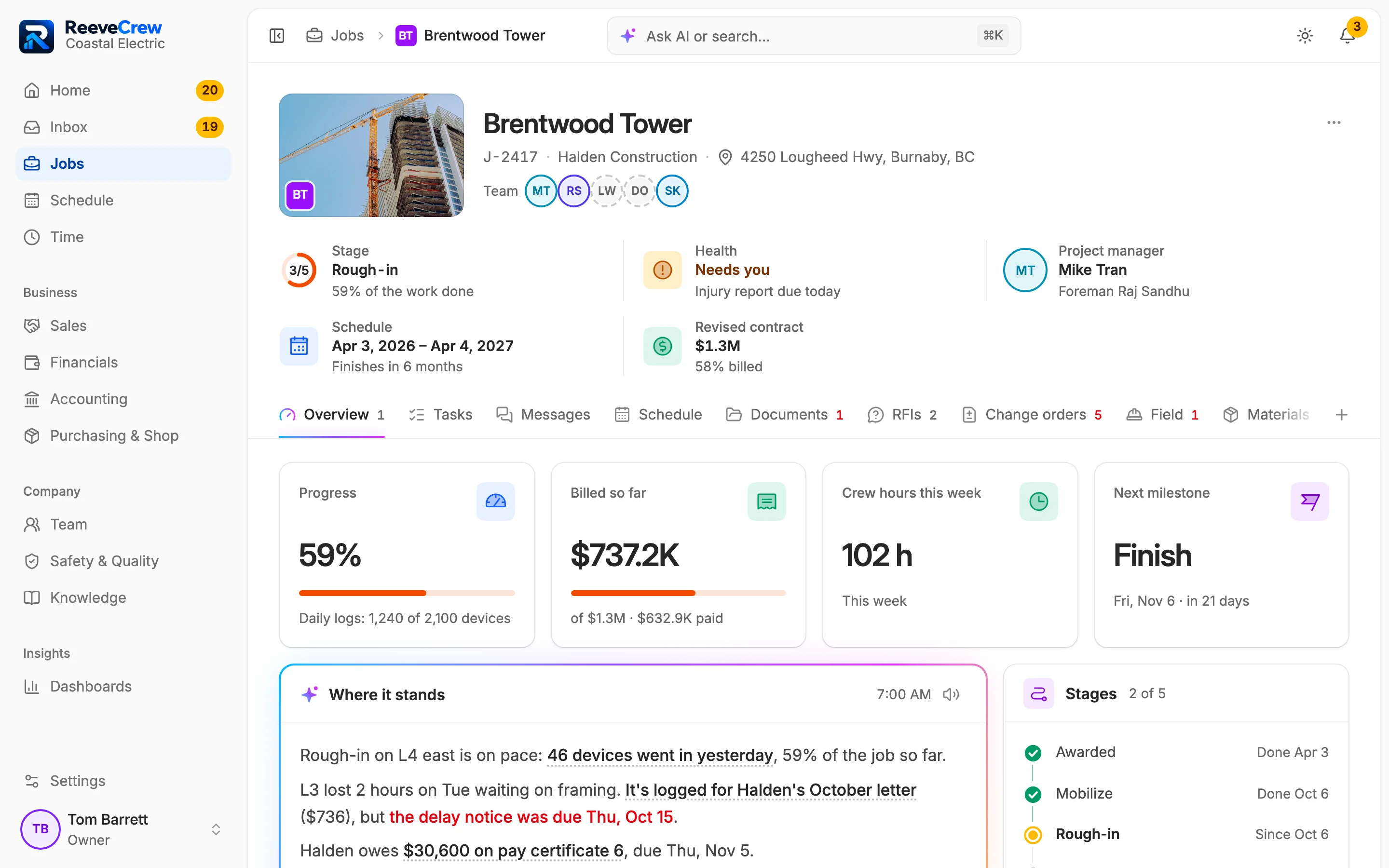
Open Brentwood Tower for its stage, next milestone, what's waiting and who to call at Halden. Its tabs follow the job's phase.
Job overview
Tabs that follow the phase
The AI's draft: Written job status
Brentwood Tower · Overview
2:20 PM
Extra work gets signed on site
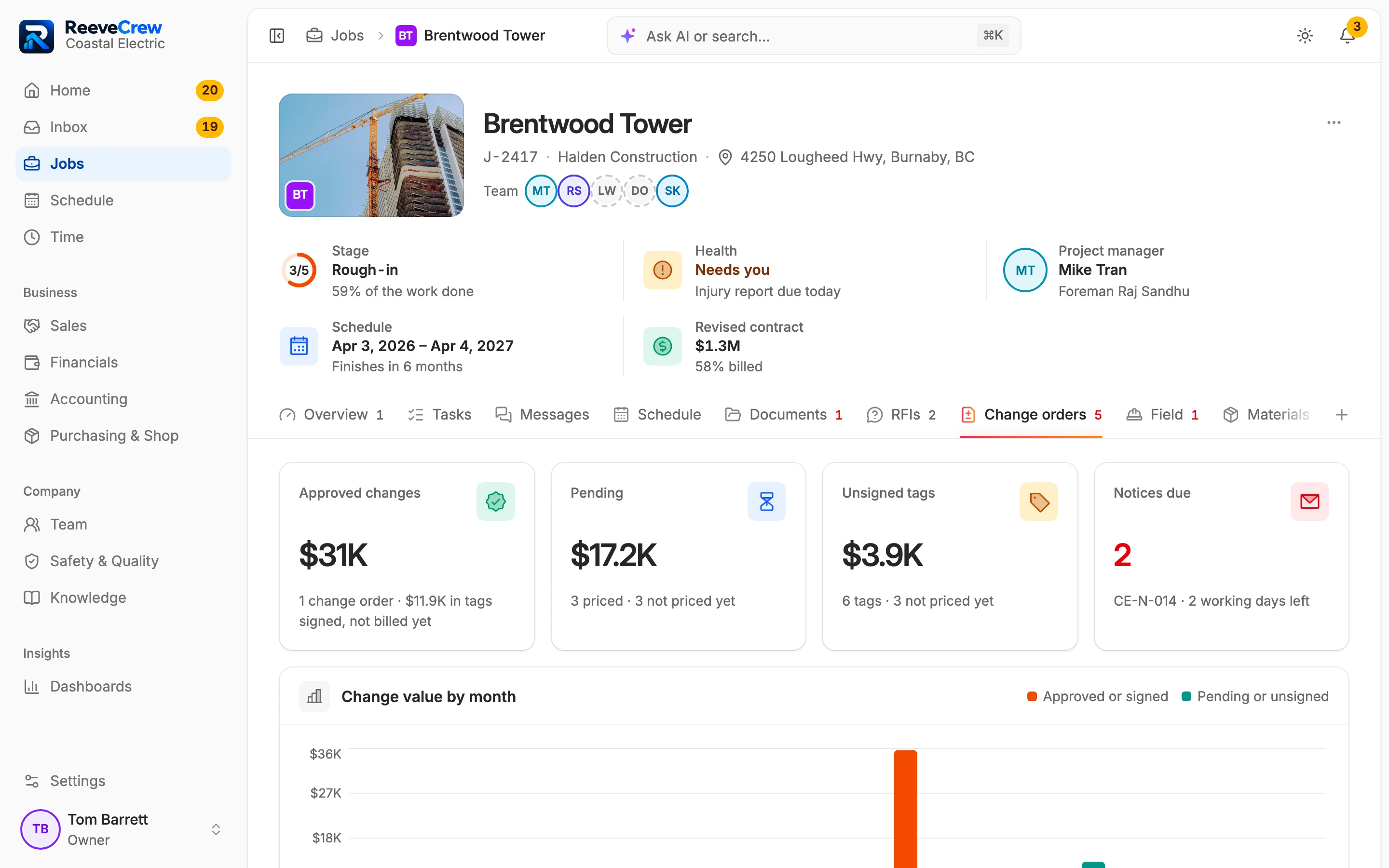
Raj writes the T&M tag on his phone and the super signs it there. The job's change orders and notice clocks sit on the same tab.
T&M tags signed on the phone
Notice clocks
Brentwood Tower · Change orders
4:30 PM
Hours checked before they're approved
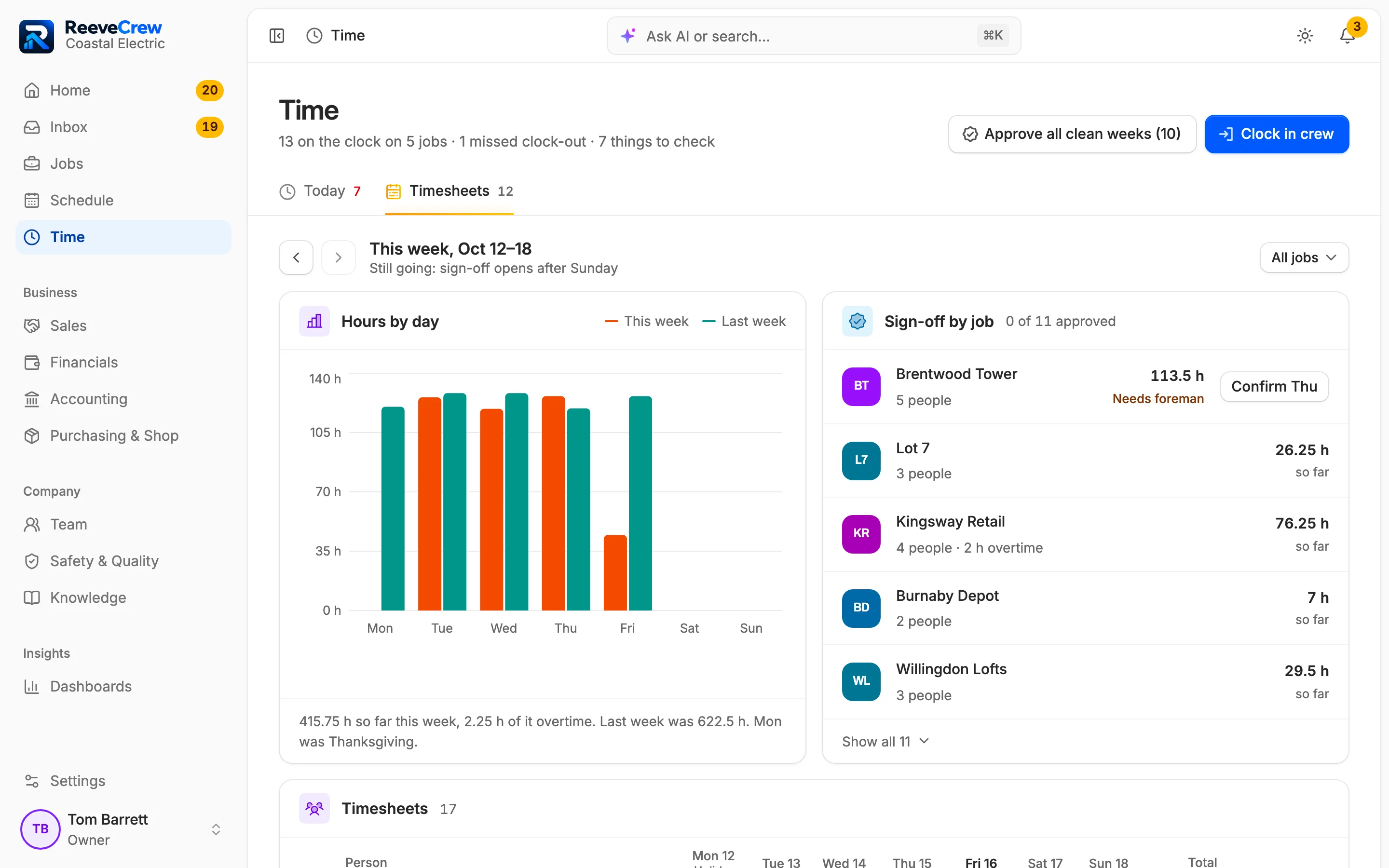
Raj signs the daily report, and every clock on the job is checked against it. The office approves clean weeks in one tap.
Hours checks
Two-step approval
Time · Timesheets
Month end
The claim goes out with holdback worked out
Build the progress claim from the schedule of values and send Halden the PDF. Pay certificates and holdback follow on the job's Financials tab.
Progress claims
Pay certificates matched
Brentwood Tower · Financials
HomeTime · TodayBrentwood Tower · OverviewBrentwood Tower · Change ordersTime · TimesheetsBrentwood Tower · FinancialsScreens from the demo company
The product
Everything a trade sub runs, on one set of records.
The office and the field work from the same records, so nothing gets typed twice. Here is what every beta company can use today, and what's on the way.
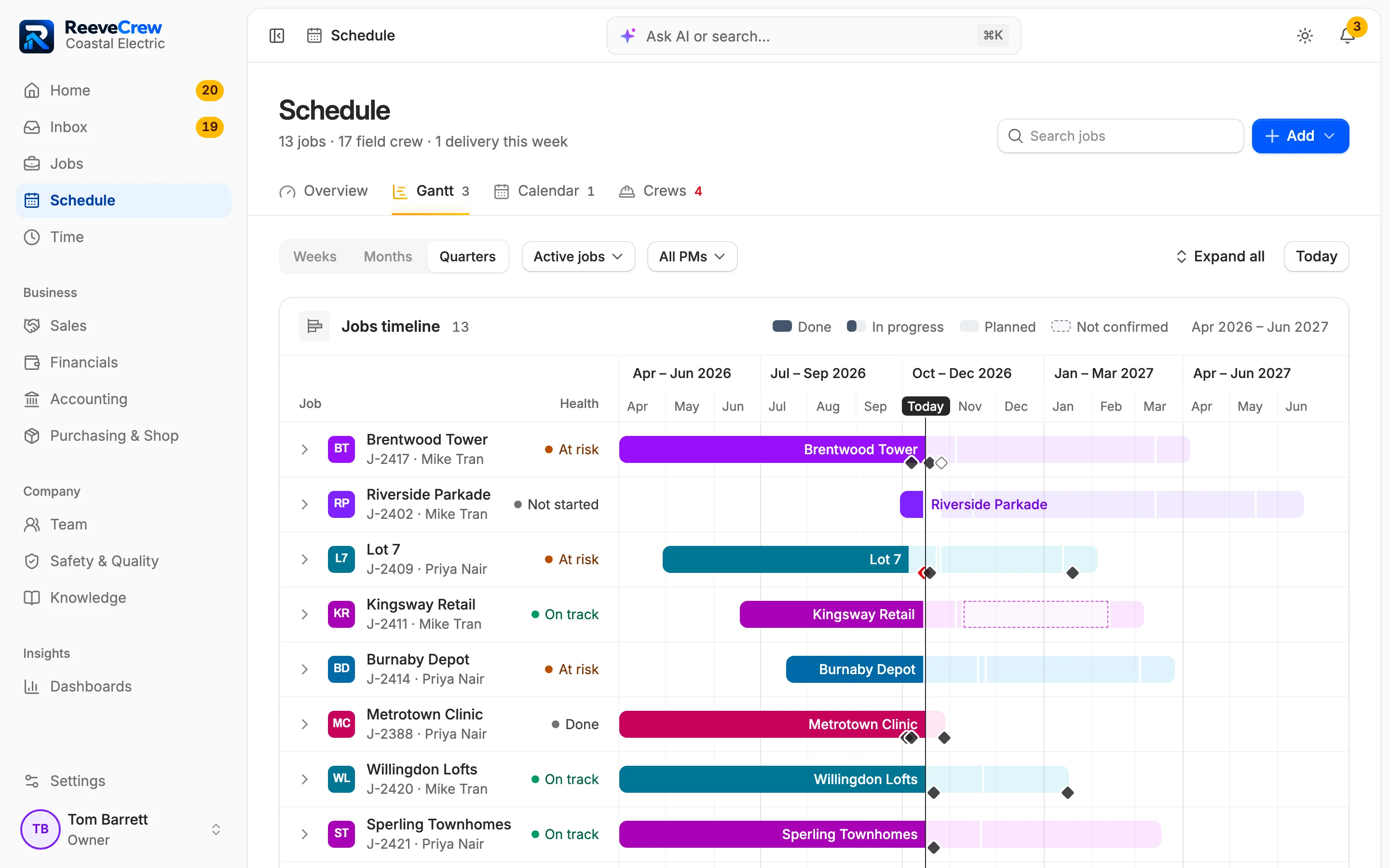
Schedule
Every job on one timeline.
Drag a stage on the Gantt to move its dates. The calendar picks up inspections, holidays and claim cutoffs from the jobs, and the crew board shows who is on which job each day.
Four views of one schedule
Overview
Gantt
Calendar
Crews
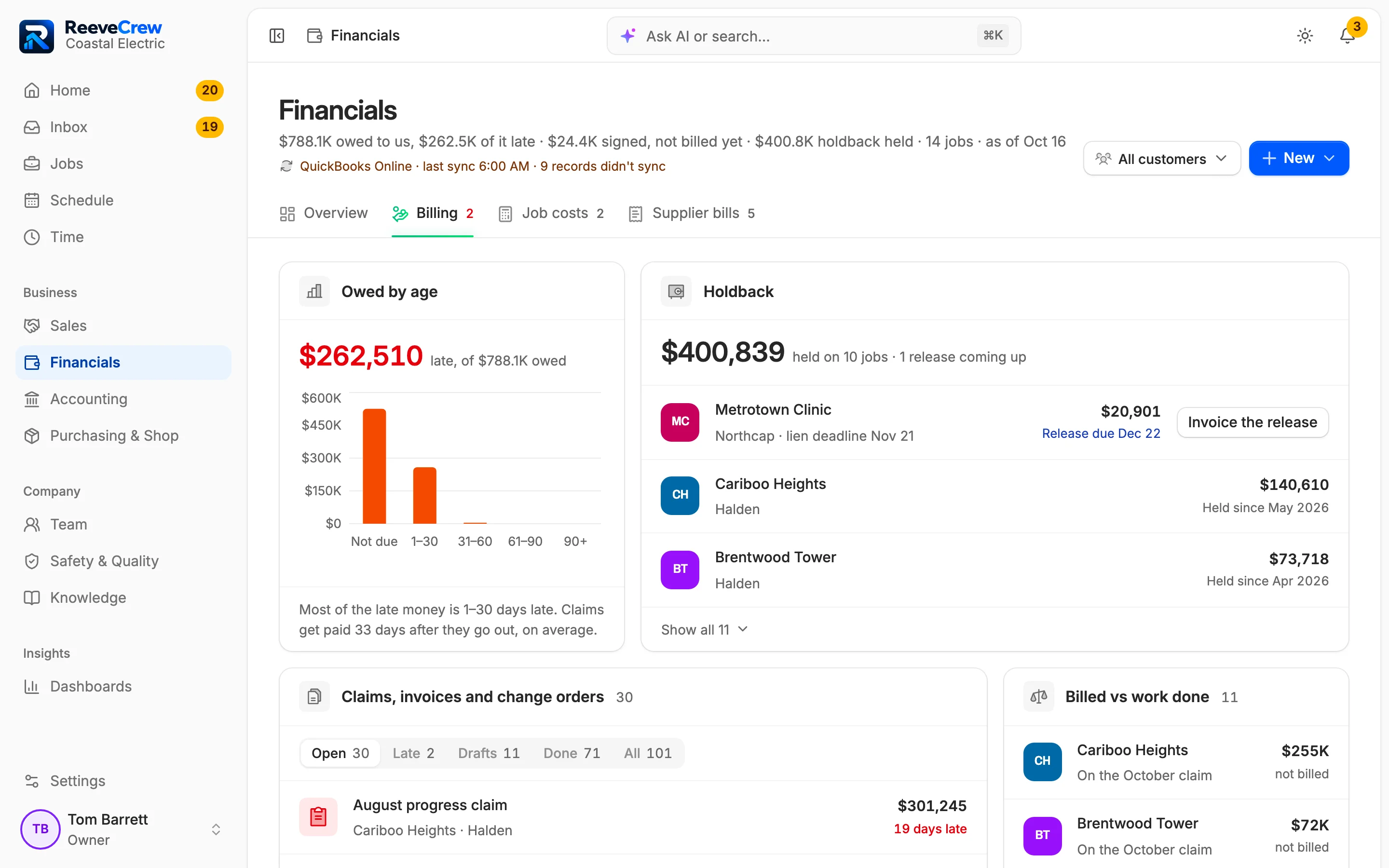
Billing and holdback
Know when your holdback is due back.
See every dollar held on every job, with its BC lien deadline and release date, and bill the release in one step.
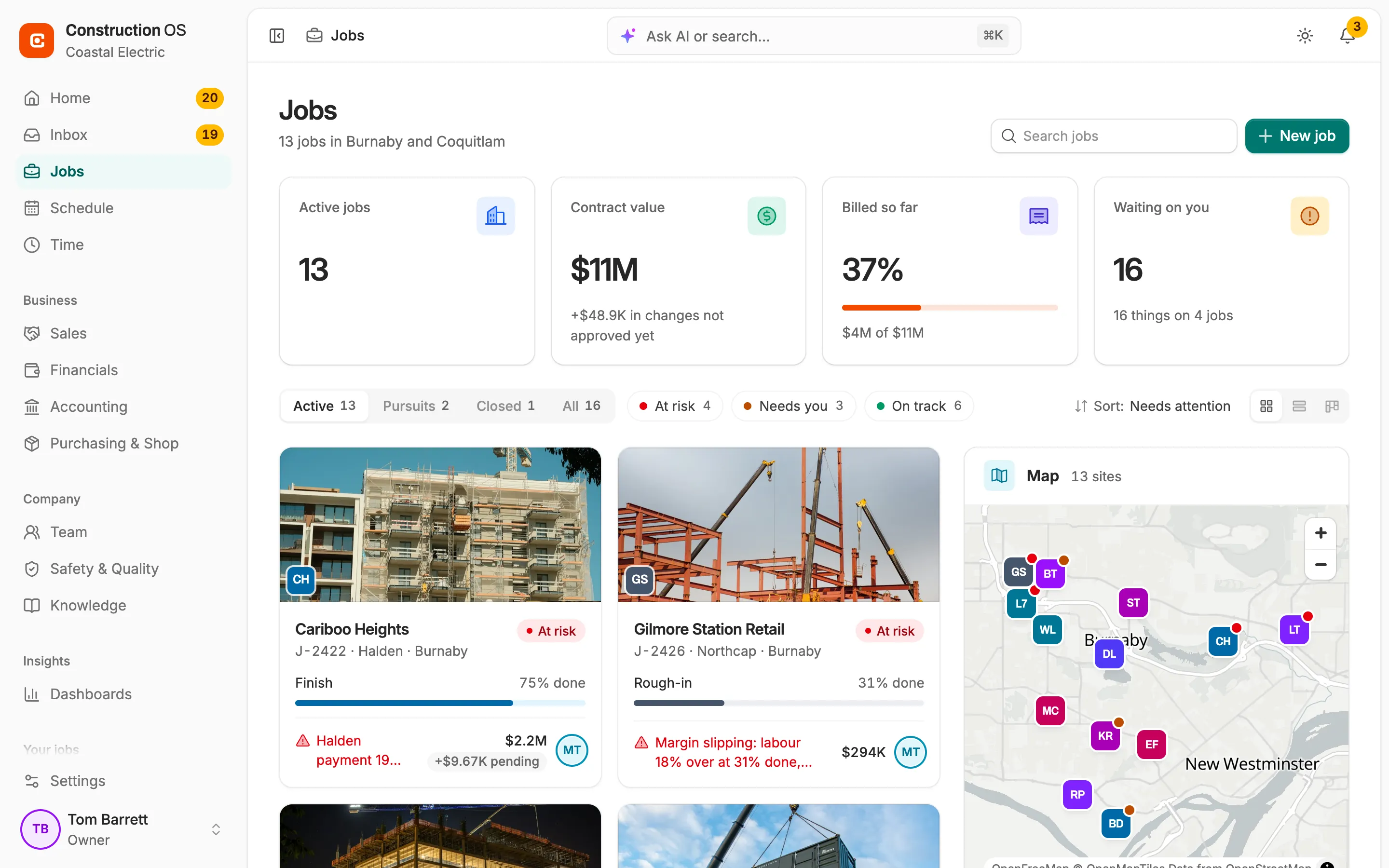
Jobs
See where every job stands.
Stage, progress and the jobs at risk in one list. Open a job and its tabs follow its phase, from the bid to the wait for holdback.
Working today
Live for every company in the beta, in Canada or the US. BC's overtime, stat holiday, WorkSafeBC and lien rules are built in.
Jobs and schedule
Plan the work and the crews.
Job tabs that follow the phase
A bid, a running job and a job waiting on holdback each show the tabs that matter then.
A prefab and shop track
Shop-built work runs from drawings to fabrication, delivery and install.
A Gantt you can drag
Every job on one timeline, with today's line and milestones. Drag a stage to move it.
Calendar and crew board
Inspections and claim cutoffs on the calendar, and who is on which job each day.
Tasks that wait on tasks
Assign a task and the person hears about it. Blocked tasks show what they wait on.
Changes and RFIs
Get paid for the extra work.
T&M tags signed on site
Hand the phone to the GC's super and get the signature before anyone forgets the work.
A possible changes register
Log extra work or a delay the day it's spotted, before anyone has priced it.
Notice clocks in working days
BC stat holidays skipped and a warning before a notice lapses. Sent notices are locked, with the GC's acknowledgement logged.
Change orders onto the next claim
Revise, approve and sign in person. Approved changes land on your next progress claim.
A numbered RFI log
Each RFI from draft to answer, and the team hears in the app when it's answered.
Billing and money
Bill on time and collect what's held.
Progress claims with holdback
Built from your schedule of values and signed change orders, holdback and tax worked out.
Pay certificates matched
Record the GC's certificate against its claim and see what's paid, held and still owed.
A holdback register with lien dates
Every dollar held, when BC's lien and release dates fall, and the release billed in one step.
Invoices and supplier bills
Invoice T&M or service work as a PDF. Code each supplier bill to a job and cost code.
Quotes signed in person
Send a quote as a PDF, get it signed on the spot and turn it into a job.
Field and safety
The paperwork done on site.
Daily reports sent the same day
The foreman signs it, and the GC gets a PDF on your letterhead.
Photos and documents on the job
Contracts, letters and site photos filed on the job, each photo linked to what it proves.
Toolbox talks signed on the phone
The crew signs on the device. No paper sheet to scan.
A safety log with Form 7 dates
FLHAs, near misses and injuries by job. Each injury shows when its WorkSafeBC Form 7 is due.
Runs in the phone's browser
Add it to the home screen. Nothing to install from an app store.
Time and payroll prep
Clean hours before payroll.
The whole crew clocked in at once
On the right job and cost code. A phone clock saves where it happened and flags one more than 150 m from the site.
Hours checked before approval
Missed clock-outs, missing cost codes and clocks that don't match the daily report.
BC overtime and stat pay split
Daily and weekly overtime, stat holidays and meal breaks, the way BC's rules say.
Two-step timesheet approval
PMs approve their job's week, then the office. Clean weeks go through in one tap.
Cost codes for your trade
Load a MasterFormat starter list for your trade, then rename or add your own.
Office and team
Nothing stuck in someone's inbox.
A Needs you list
The tags, RFIs and notices waiting on you. Clear, snooze or hand each one off in a click.
Email and texts from the job
Write the GC or text a foreman from the job's conversation, and see that it arrived.
A bell for what changed
Know in the app when a tag is signed, a change order approved or an RFI answered.
Four roles, money kept to the office
Owner, PM, office and foreman. Turn money on for a foreman when you choose.
Six-step setup and invites
Set your working week, pay terms and holdback, then invite the office and foremen.
On the way in the beta
Designed and shown in our demo company, not live for beta companies yet.
Accounting sync
Invoices, bills and payments copied to QuickBooks, Xero or Sage 50.
Payroll export
Pay runs from approved timesheets, as a file your payroll provider imports.
Purchasing and shop
Purchase orders, deliveries and shop fabrication, tied to the job.
Company dashboards
Money, work ahead and safety across every job, on one page.
Sales pipeline
Leads and bids in one place, with your win rate.
Knowledge
Your SOPs and step-by-step training, where the crew can find them.
Running something we haven't listed? Tell us what you'd fix first when you join the waitlist.
Built-in AI
An AI teammate that does the typing.
It reads what comes in, drafts the next step and answers questions about any job from your own records. You check it and send it.
First drafts it writes for you to check
Replies to the GC
RFIs
Change and delay notices
Daily reports
Cost codes
Nothing goes out until you send itWhat it writes stays a draft until someone on your team confirms it. The GC and the crew only get what a person sent.
Every answer shows its sourcesAnswers link to the pay certificate, tag or message they came from, so you can check a number in one click.
It sees what you can seeAsk as a foreman and money stays out of the answer, unless the owner turned on Can see money for you.
Ask ReeveCrew
Demo company: Coastal Electric
What does Halden owe us on Brentwood?⌘K
Try asking
You asked: What does Halden owe us on Brentwood?
ReeveCrew·Checked 2 records
Halden owes you $30.6K on Brentwood Tower, due Thu, Nov 5. None of it is late. Another $73.7K is held back from 6 pay certificates.
BTBilled to date58% of the $1.3M contract$737.2K
PaidReceived from Halden$632.9K
Holdback heldFrom 6 pay certificates$73.7K
Owed nowPay certificate 6, due Thu, Nov 5$30.6K
Sources
Pay certificate 6
Holdback register
You asked: Where do changes stand on Brentwood?
ReeveCrew·Checked 3 registers
Halden has approved $31K in changes and $17.2K is pending. 6 T&M tags worth $3.9K still need the super's signature, and notice CE-N-014 has 2 working days left.
Approved change ordersCO-7, approved by Halden$31K
Pending changes3 priced, 3 not priced yet$17.2K
Unsigned T&M tags6 tags waiting for the super's signature$3.9K
Notices dueCE-N-014 has 2 working days left2
Sources
Change orders
T&M tags
Notice CE-N-014
Next step
You asked: Who's on Brentwood today?
ReeveCrew·Checked 2 records
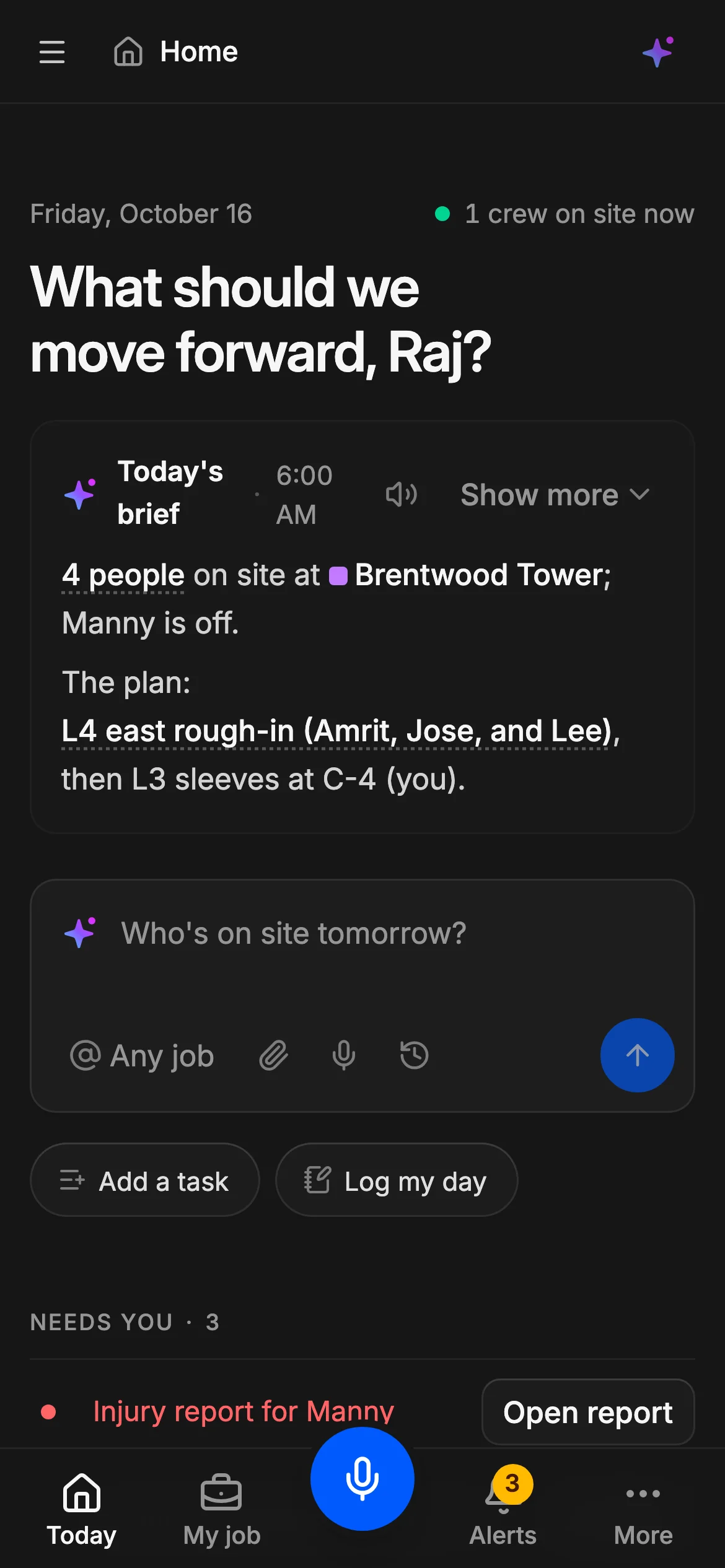
4 people are on site at Brentwood Tower today: Raj, Amrit, Jose and Lee. Manny is off.
BTBrentwood TowerToday
RSRaj SandhuForemanL3 sleeves at C-4On site
AGAmrit GillJourneypersonL4 east rough-inOn site
JMJose MoralesElectricianL4 east rough-inOn site
LCLee ChenApprenticeL4 east rough-inOn site
MSManny SantosApprenticeOff todayOff
Sources
Crew board
Today's clock-ins
You asked: Draft the LP-4 change notice for Halden
ReeveCrew·Read 3 records, wrote 1 draft
Drafted change notice CE-N-014 from Raj's voice note and Lisa's email. It's due Tue, Oct 20: 4 working days under clause 7.2.
DraftDue Tue, Oct 20: 2 working days left
To
Halden Construction, notices
Job
BTBrentwood Tower
Subject
Change notice: move panel LP-4
On Wed, Oct 14, Dan asked Raj to move panel LP-4 to grid C-4. Lisa Wu confirmed by email the same day ("Please proceed per Dan"). Revision C (sheet E-201) also shows LP-4 at grid C-4.
This is a change to our scope (CH-31). We will send a priced change request once the work is measured. Time and materials are being tracked on signed tags.
Stays a draft until you confirm it.RewriteConfirm draft
Sources
Raj's voice note (Punjabi)
Lisa's email
Sheet E-201, Rev C
Made for the foreman's phone.
Your foreman clocks in the crew and files the safety paperwork on the phone he already carries, before anyone leaves site. The office stops chasing paper.
Clock in the whole crew in one tap
Everyone on site lands on the right job and cost code. A punch more than 150 m from the site gets flagged.
Toolbox talks signed on the phone
The crew signs on the screen, so there's no paper sheet to scan. FLHAs and near misses go on the job's safety log.
Photos stay with the work they prove
Site photos go on the job, linked to the record they back up.
Nothing to install
It runs in the phone's browser. Add it to the home screen and it opens like any other app.
6:00
6:00
6:00
RS
Raj SandhuVoice note from site
Voice note, 0:40
“Done for today. Amrit, Jose, Lee and me, 8 hours each. Manny is off.”
Daily report drafted4 timesheets, 32 h
Raj8 h
Amrit8 h
Jose8 h
Lee8 h
A draft until Raj checks it and signs.
Raj's voice note is shown with Coastal Electric, the demo company in the app. The AI's draft waits for Raj to check and sign it.
Control and security
You stay in charge.
Each person signs in with a role, and the server decides what that role can see. Money stays with the office unless you turn it on for a foreman, and nothing the AI drafts goes out until a person checks it.
A role for every sign-in
Owner, PM, office or foreman. Each person sees the tabs their role allows and nothing else.
Money stays with the office
The server takes the numbers out before they reach anyone who can't see them. Turn on Can see money for a foreman you trust with them.
Drafts stay drafts
Nothing a foreman or the AI drafts is final until a person confirms it, and a one-click change can be undone.
Your company's records, kept apart
Each company's data is fenced off from every other company's in the database, table by table.
AI trail
Coastal Electric · last 24 hours
Inbox agent · 7:02 AM
Drafted a reply to Raj: hold off on the C-4 boxes until Halden answers RFI 015.
From: Raj's text, in PunjabiNeeds Mike's OK
Site log agent · 6:20 AM
Added the 46 devices that went in on L4 east to yesterday's daily report.
From: Photos from L4 eastConfirmed by Raj
Inbox agent · Yesterday, 4:10 PM
Filed Halden's email about the L3 sleeves to Riverside Parkade.
From: Halden's email, Oct 15Taken back by Tom
1 waiting for an OK1 taken back
Who sees what
Coastal Electric
What each role can see
Role
Money
Injury details
Field
OwnerTom Barrett
Sees it
Sees it
Sees it
PMMike Tran
Sees it
Hidden
Sees it
Office
Sees it
Sees it
Sees it
ForemanRaj Sandhu
Hidden
Hidden
Sees it
Can see moneyRaj Sandhu, foreman
Off for every foreman until you switch it on. For anyone who can't see money, the server removes it before it leaves.
The AI trail is shown with Coastal Electric, the demo company in the app.
Private beta
Run your own jobs on ReeveCrew during the beta.
You run it on your live jobs and help decide what it does next. We set it up with you, so you start with your own jobs, crews and cost codes in place.
Trades
Electrical, mechanical, plumbing, glazing, drywall, concrete and specialty
Where
Canada and the US
Field staff
5 to 100+
Now inviting trade contractors
Free
while in beta
Nothing to pay while it's in beta. You hear about pricing before the beta ends.
We bring in your jobs, crews and cost codes during setup, so day one runs on real work.
Or set it up yourself
Six short steps: your trade, where you work, your working week, how you get paid, your team and your first job.
Bring your office and foremen
Invite them by email with the right role. Money stays with the office unless you turn it on for a foreman.
Nothing to install
Foremen open it in their phone's browser and add it to the home screen.
A direct line to the team building it
Ask a question or report a problem and the people who make it answer.
A say in what's next
Tell us what's missing and help decide what gets built.
Questions subs ask us
Plain answers about fit, the field, money, the AI and setup, including what works today and what's still on the way.
Who it's for
Is ReeveCrew for subcontractors or general contractors?
Subcontractors. It's construction software for trade subs who work under a GC: electrical, mechanical, plumbing, glazing, drywall, concrete and other specialty trades, with about 5 to 100+ people in the field. It's built around a sub's paperwork: T&M tags, change orders, notices, RFIs, daily reports, progress claims and holdback.
My GC already makes us use Procore. Why would we need our own system?
The GC's system holds the GC's records. ReeveCrew holds yours: your crews and their hours, your T&M tags and change orders, your notice deadlines, your progress claims and the holdback you're owed. RFIs are drafted here and copied into the GC's portal, and your Needs you list shows the drafts you haven't copied yet.
Do you work in the US as well as Canada?
Yes. You set your country, province or state and currency (CAD or USD) when you set up the company, and progress claims carry holdback in Canada or retainage in the US. British Columbia's rules are built in today: overtime and stat holidays, notice deadlines that skip BC holidays, WorkSafeBC Form 7 dates and the Builders Lien Act's holdback dates. Rules for other provinces and states aren't built in yet.
In the field
Will my foremen actually use it?
It asks for a few taps on the phone they already carry. One tap clocks in the whole crew on the right job and cost code. The GC's super signs T&M tags on that phone, the crew signs the toolbox talk on it, and the foreman signs the daily report, which goes to the GC as a PDF the same day. Crew members don't need their own sign-in. ReeveCrew runs in the phone's browser, so there's nothing to install from an app store: add it to the home screen and it's one tap away.
How do T&M tags work?
The foreman writes the tag on the phone with labour, material and equipment lines, and the GC's super signs it on the spot by drawing or typing their name. The office gets a notification in the app when a tag is signed, refused or disputed. Each tag is tied to the extra work it covers, so it can roll into a change order and onto your next progress claim.
Does it handle safety paperwork like FLHAs and WorkSafeBC forms?
The safety log keeps FLHAs, toolbox talks, near misses, first aid and injuries by job. The crew signs the toolbox talk on the foreman's phone. Every injury shows the date its WorkSafeBC Form 7 is due, three days after the injury, and you record when the form went in. Only the owner and office see injury details.
Time and money
Does it track notice deadlines for changes and delays?
Yes. Log extra work or a delay the day you spot it, and it carries the contract's notice clock. Deadlines count working days, skipping weekends and BC statutory holidays. The owner, office and PM get a warning in the app when a notice is due within a working day. Once a notice is recorded as sent, it's locked, and you can log the GC's acknowledgement.
How does it handle holdback and retainage?
Set a default holdback percentage once, and every progress claim takes it off at the job's rate. Holdback held follows each pay certificate from the GC, and the holdback register shows what's held on every job. In BC it shows when release falls due, 55 days after substantial completion, and the 45-day lien filing window. You bill the release from what's held in one step. US companies see the same as retainage.
How do time, cost codes and payroll prep work?
Start with MasterFormat cost codes for your trade and change them as you go. A clock-in from a phone saves where it happened and is flagged if it's more than 150 m from the site. Hours split the way BC's Employment Standards say. Before approval, missed clock-outs, missing cost codes and clocks that don't match the daily report are flagged. The PM approves the job's week, then the office approves clean weeks in one tap. Your payroll provider still runs pay, tax and deductions.
Do I have to replace my accounting software?
No. Keep your books where they are. ReeveCrew runs the job side of the money: progress claims, invoices, pay certificates, payments received and supplier bills coded to the job. A sync with QuickBooks, Xero and Sage 50 is on the way in the beta. Until it's ready, your bookkeeper keeps the books the way they do today.
The AI and your data
What does the AI do on its own, and what waits for me?
It does the typing, and you make the calls. With our demo company, Coastal Electric, it files each message to its job, writes the 6:00 AM brief and drafts replies, RFIs, change notices and daily reports. Every record starts as a draft, and nothing becomes final or goes to a GC until a person checks it and sends it. It only sees what the person asking is allowed to see.
Who can see the money?
Everyone signs in with one of four roles: owner, PM, office or foreman. For a role that can't see money, the server removes the amounts before anything is sent, so they aren't only hidden on screen. Money stays with the office unless you turn on Can see money for a foreman, one foreman at a time.
Is our data safe?
Each company's data is kept apart in the database, and everyone in the office and every foreman signs in with their own account. During setup we walk you through where your data is stored and who can reach it, before anything is brought in.
Cost and setup
What does it cost?
Nothing while in beta. We'll share pricing before the beta ends, and you decide then whether to keep going.
How does setup work?
We set it up with you. During setup we bring in your jobs, crews and cost codes, so your first week runs on your own work. If you'd rather do it yourself, the owner sets up the company in six steps (trade, where you work, working days, pay terms and holdback, the team, the first job) and invites the office and foremen by email.
Something else on your mind? Join the waitlist and ask us on the short call we set up with you.
Go home when your crew does.
Tags get signed on site and the daily report reaches the GC the same day. Join now and we'll set it up with you, on your own jobs and crews.
Free while in beta. For trade contractors in Canada and the US.